☑️ Mark a Prospect as Deleted in ParcVu Desktop
Last updated 9 months ago
Users will need the permission Allow Delete as Prospect to access this function
To mark a Prospect as Deleted, select ‘Prospect’ from the Main Menu and the ‘Find Prospect’ screen will be displayed.

Find the required ‘Prospect’ using any of the search facilities displayed and click
Click on the required ‘Prospect’ from the displayed list and select ‘View Prospect’ from the Navigation list on the right.
Once in the ‘Prospect Details’ screen, select ‘Edit’ from the Navigation list on the right.
Click into the ‘Delete as Prospect’ field at the bottom of the Name and Address fields to ‘Tick’ and select it.
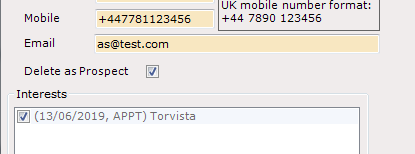
Click ‘Save’ on the Navigation list on the right and the Prospect will be marked as ‘Deleted’.
The Prospect will still exist in the system, but won’t appear in the find screen unless deleted Prospects are explicitly included
Received a Right to be Forgotten request from one of your customers? Contact ParcVu Support for assistance