☑️ Sublet Years in ParcVu Desktop
Last updated 6 months ago
The Sublet Agreements function in ParcVu Desktop is only available to existing customers who previously signed up for the legacy ParcVu Bookings module. New subscribers will be offered enrolment in the Booking Experts module. Existing customers using legacy Bookings will be offered the opportunity to upgrade to Booking Experts - contact your Account Manager for more information
In order for a Sublet Agreement to be created, there must be a Sublet Year set. When trying to create a new Agreement, if the relevant year has not been created, a red exclamation mark will appear. Hovering over this will display the following message
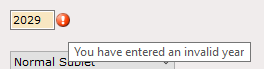
This is not a system error and does not need to be reported to ParcVu Support - follow the steps below to add the Year, and this will resolve
To access this functionality, the user will need the Allow System Access Menu user permission
From the Home Screen, go to System Maintenance Sub Menu > Maintain Lookups > Sublet Years. A record must be created for each Park for each Year
You should enter the dates that subletting is permitted on each Park (usually this will be the same as your Holiday Licence period)
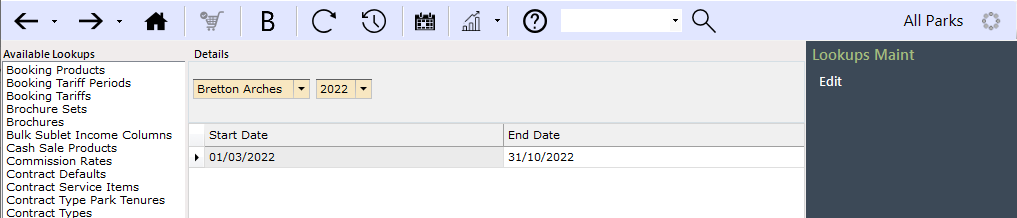
You cannot create a Sublet Year unless a Park Year has also been created in System Maintenance Sub Menu > Maintain Lookups > Park Years
If the year you need is not available to select in Sublet Years, check that the Park Year exists
A Sublet Year cannot span multiple Park Years (for example, if your Park Year ends 31/12/2026, you cannot have a Sublet Year which runs until 02/01/2027)