Add a Touring Area in ParcVu Desktop
Last updated 4 months ago
The Touring Areas function in ParcVu Desktop is only available to existing customers who previously signed up for the legacy ParcVu Bookings module. New subscribers will be offered enrolment in the Booking Experts module. Existing customers using legacy Bookings will be offered the opportunity to upgrade to Booking Experts - contact your Account Manager for more information
In System Maintenance Sub Menu > Maintain Park Structure, new Areas, Zones and Pitches can be created
The Park must be selected in the top right corner for this menu option to be available - if the option is greyed out, ensure you have a Park selected
Click on the ‘P’ – Park Name in this column to highlight it, select ‘Add Area’ from the Navigation list on the right of the screen.

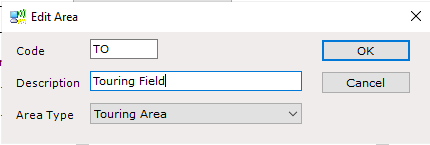
The ‘Edit Area’ field will appear, type the Area ‘Two letter Code’ into the ‘Code’ field, type the Area ‘Name’ into the ‘Description’ field, use the drop-down list in the ‘Area Type’ field to select the Area Type and set as Touring Area. click ‘OK’ when finished.
The New ‘Area’ will now appear on the Park list on the left-hand side of the screen
Within the Area, you can create Zones and Pitches - you can find out more about how to do this here: Adding a Zone & Creating Pitches