☑️Water Types in ParcVu Desktop
Last updated 7 months ago
When a Pitch is set up in ParcVu, the ‘Water’ type for that pitch is selected, there are three options, Metered, Piped and None.
When selecting to enter a ‘Water’ reading, the system will check to see if the ‘Water’ type chosen is the same as the flag set on the Pitch.
If it is not the same, you will be prompted to decide whether or not you wish to change the ‘Water’ flag on the Pitch.
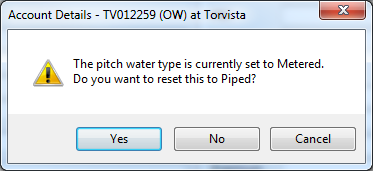
Selecting ‘Yes’ to the message displayed will change the ‘Water’ flag on the Pitch, be sure that this is correct or, if not, click ‘Cancel’ and re-select the Water Reading Type you wish to enter