☑️ Park Fuel Rates & Charges in ParcVu Desktop
Last updated 7 months ago
Utility Billing Is Now Available in ParcVu Online!
This function is now available in ParcVu Online! For the best experience, we recommend switching to ParcVu Online to ensure you always have access to the latest features
Continue Using ParcVu Desktop:
To access this function, Users must have the Allow System Maintenance Menu permission and be a Head Office User
To bill utilities based on usage in ParcVu, the Rates & Charges must be set per Park
Go to System Maintenance Sub Menu > Maintain Lookups > Park Fuel Rates & Charges
Enter the relevant Unit Rates and any Standing Charges that apply, by entering them in the ‘Value’ column for each Charge that applies for each utility per Park
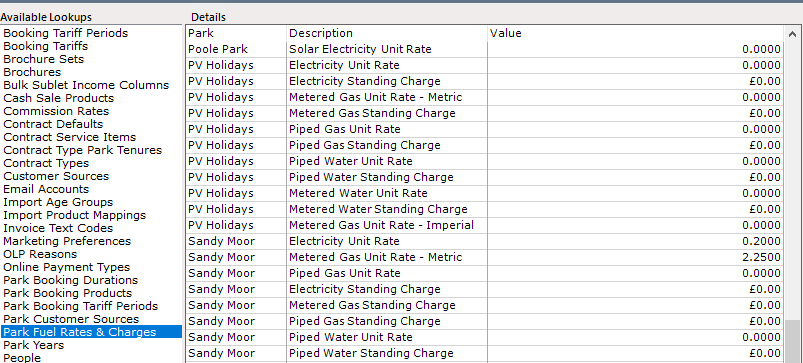
Pay close attention to which Rates you are entering - there are multiple options for both Water and Gas, and it’s important to know which type of meters and billing model you are using on your Park to ensure Customers are billed accurately
Select ‘Save’ from the Navigation list on the right-hand side of the screen
Meter readings cannot be reversed once the invoices are posted in ParcVu Desktop. We therefore recommend all Users are aware of what a reading appearing in red means, and that meter readings are always sense-checked prior to invoicing