Add a Booking Agent in ParcVu Desktop
Last updated 4 months ago
The Booking Agents function in ParcVu Desktop is only available to existing customers who previously signed up for the legacy ParcVu Bookings module. New subscribers will be offered enrolment in the Booking Experts module. Existing customers using legacy Bookings will be offered the opportunity to upgrade to Booking Experts - contact your Account Manager for more information
To access this function the user will need the Allow System Maintenance Menu user permission
From the Home Screen, go to System Maintenance Sub Menu > Maintain Lookups > Booking Agents
Select ‘Edit’ from the Navigation list on the right and the ‘Details’ screen will be highlighted in yellow.
Click into the first blank line in the grid and enter the information for the new Agent
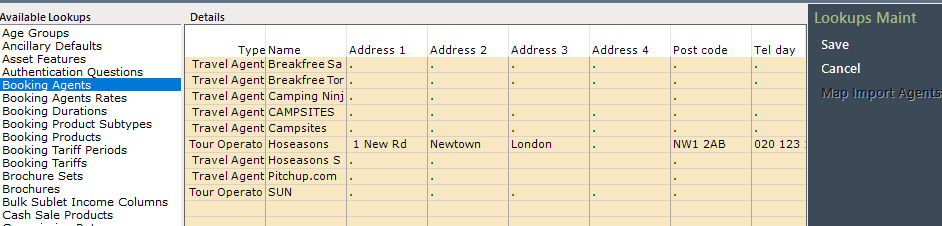
Type is the type of Agent this is - for example Travel Agent (including OTAs)
Name is the name of the Agent for example Hoseasons
Address 1 - Postcode are the address details for the Agent’s head office/contact centre
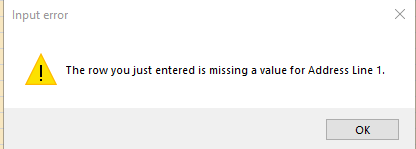
Address lines 1, 2 and Postcode are mandatory - if you do not have this information, entering a full stop in each field is sufficient
If you see a message like the below this is not a system error and does not need to be supplied to ParcVu Support. Entering the missing information will enable you to save the record
Tel day/Tel eve are the contact numbers for the Agent
Email is the email address which should be used for enquiries to this Agent
ABTA No is the registered number the Agent has with the Association of British Travel Agents - not all Agents will have this
The Deleted column allows you to mark an Agent you no longer use as ‘Deleted’ - this will not remove the Agent’s record from the system, or affect any existing Bookings for that Agent
Comm Rate is the commission rate which applies to this Agent, select the appropriate rate from the dropdown
Commission Rates must be set up before you’re able to add a new Agent. Find out more about Commission Rates here: Booking Commission Rates
Always Takes Commission and Payment Due are part of a legacy functionality which is no longer used
Reverse Credit on Cancellation should be set if you wish to reverse the value of a cancelled Booking on cancellation
Agent Accounts allows you to determine which specific Agents will work with the single Agent Ledger rather than individual Guest Ledgers, allowing you the flexibility to only use Agent Accounts for specific Agents. If you do not wish to use this function for this Agent, you’ll need to set the flag to true, then clear it
This function will only work if you have Agent Accounts enabled - find out more about Agent Accounts here: Agent Accounts
When checking or unchecking this box, you will be given warning messages about the action you are taking
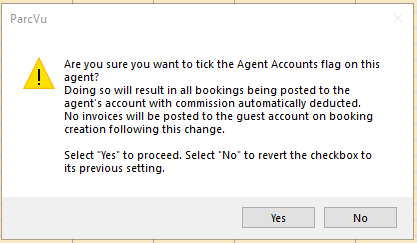
This is not a system error, and you do not need to report it to ParcVu Support - after reviewing the message and deciding if this is the change you want to make, press Yes to proceed with the change, or no to exit
Contact Name can be used to store the name of a specific contact, such as an Account Manager
Title is the job title of the Contact
Fax is a legacy field from when fax numbers were used to contact the Agents
Post Extras to Guest allows you to choose whether to post any Extras to the Agent Account (where Agent Accounts is enabled) or to the Guest Account. It’s possible to have the accommodation cost go to the Agent Account and the Extras to a separate Guest Account, if preferred
Calculate Commission on Net allows you to decide whether, for that particular Agent, commission should be calculated on the Net (excluding VAT) or Gross (including VAT) amount
When finished, select ‘Save’ on the Navigation list on the right and the details will be updated on the system and will be selectable within the Bookings system