Commission Rates in ParcVu Desktop
Last updated 4 months ago
Different types of commission can be defined to determine commission charges to subletters - these rates are also required when setting up a new Booking Agent, and can be used to define the commission scheme a Salesperson has for Holiday Home Sales
To access this function the user will need the Allow System Maintenance Menu user permission
Go to System Maintenance Sub Menu > Maintain Lookups > Commission Rates
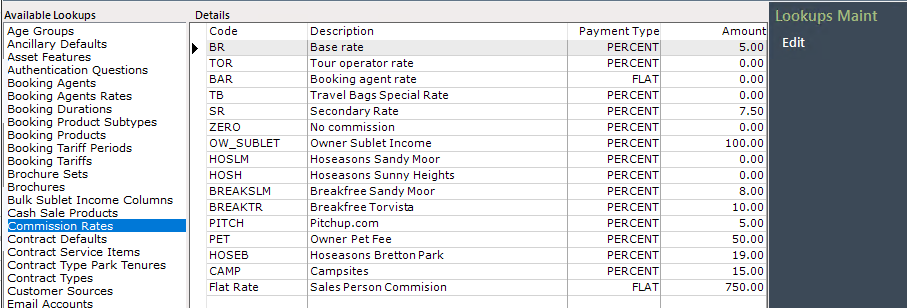
Selecting Edit on the navigation list will highlight the screen, an existing entry can be amended by clicking onto the required row and changing the information as appropriate, new entries can be added on a blank row
Code is an internal code to identify this commission rate. This will appear in dropdowns and must be unique (ie you can’t have 2 rates with the same code)
Description is the name of that rate, for example you may wish to name it the Agent name, or enter a simple description like “Owner Sublet”
Payment Type determines whether this is a flat commission charged, or a percentage
Amount is either the fixed amount (if the Payment Type is ‘Flat’) or the percentage amount (if the Payment Type is ‘Percent’)
When setting these commissions it’s important to note that in the context of Salesperson commissions and Sublet Commissions, this is the fixed amount or percentage amount which will be received by that person, before any other charges or deductions
So for example, if you set an Owner’s Sublet Commission Rate to 15%, this would mean they only receive 15% of the total Booking amount before any other deductions
If your sublet income looks incorrect, check that the correct rates have been set for the Sublet Agreement - usually for Owner Sublet Agreements, the starting point should be a commission rate of 100% for ‘standard’ sublet, then any commissions and charges are deducted from that 100% starting point