☑️Upload a Signed OLP Record in ParcVu Desktop
Last updated 11 months ago
When the document is agreed and has been signed, a copy can be uploaded into ParcVu against the OLP Record using the ‘Upload Document’ navigation option.
When a document has been uploaded, the ‘Signed OLP Uploaded’ flag can be set on the OLP Record, by selecting ‘Edit’ and ‘Ticking’ the field, when ‘Saved’ the details will be updated
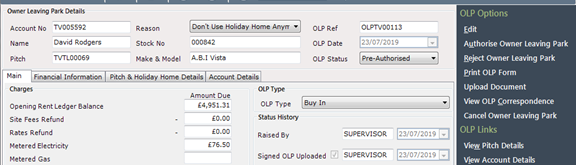
An uploaded document can then be viewed at any time by selecting the ‘View OLP Correspondence’ option on the navigation list.
Any correspondence printed or uploaded can then be viewed at any time by selecting the ‘View OLP Correspondence’ option on the navigation list.