Customer Sources in ParcVu Online
Last updated About 2 hours ago
Customer Sources is a Lookup that allows you to define where your Holiday Home Sales or Holiday Bookings come from - this information is useful for marketing purposes, allowing you to better understand your ROI on various campaigns and understand which partnerships are most effective
To access this area of the system the User will need both the Allow System Maintenance Menu and Can Maintain Customer Sources permissions
Caravan Sales Sources v Holiday Sources
If set for use in ‘Caravan Sales’ the Source Code will appear in the 'Source' drop down list selector for:
Sales
Prospects
Prospect Holiday Home Ownership Brochure Requests
If set for use in’ Holidays’ the Source Code will appear in the 'Source' drop down list selector for:
Bookings
Holiday Brochure Requests
If set for ‘Both’ then they will appear in all of the above picklists
Customer Sources in ParcVu Online
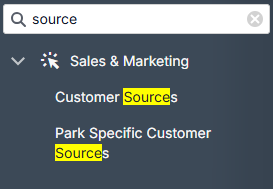
From the System Settings menu, under Sales & Marketing choose Customer Sources
The System Settings menu in ParcVu Online is searchable - save time by finding the setting you’re looking for with key words!
Existing sources will be displayed
To add a new source click New

Enter a Code, Description and define whether it should be available for Caravan Sales, Holidays, or both
The description you enter here will be exactly as it’s displayed in the system. The code can be set to any short code you wish
To edit an existing source, you can make changes directly in the table
Click Save in the top right of the screen once any additions and amendments are complete
If you amend a Source Code Description, when you select 'Save' a warning message may appear stating 'Source Code ************** has been used - changing the description will change all previous instances to the new description'
This means that any references to that Source in the system will be updated to the new values. This is not a system error and does not need to be reported to ParcVu Support. Please only amend an existing Customer Source if you’re happy to lose the history of the previous detail
Park Specific Source Codes in ParcVu Online
If you’d like to make a Customer Source for specific Parks only, you can use the Park Customer Sources
From the System Settings menu, under Sales & Marketing choose Park Specific Customer Sources
The System Settings menu in ParcVu Online is searchable - save time by finding the setting you’re looking for with key words!
Existing sources will be displayed
Click New to add a new Source to a specific Park, or Edit to change an existing one

You can also add a source to all Parks if you choose, though this is not necessary - by default Customer Sources will be available at all Parks unless you choose specific Parks only
Still need help? Share an idea