Set Booking Durations in ParcVu Desktop
Last updated 4 months ago
The Booking Durations function in ParcVu Desktop is only available to existing customers who previously signed up for the legacy ParcVu Bookings module. New subscribers will be offered enrolment in the Booking Experts module. Existing customers using legacy Bookings will be offered the opportunity to upgrade to Booking Experts - contact your Account Manager for more information
Booking Durations allow you to define the types of breaks you allow Bookings for, and determine what check-in days apply to those breaks. The Booking Durations are then defined per Park, and used in the Booking Tariffs to determine the pricing for those breaks
To access this function, users must have the Allow Access System Sub Menu user permissions
From the Home screen, go to System Maintenance Sub Menu > Maintain Lookups > Booking Durations
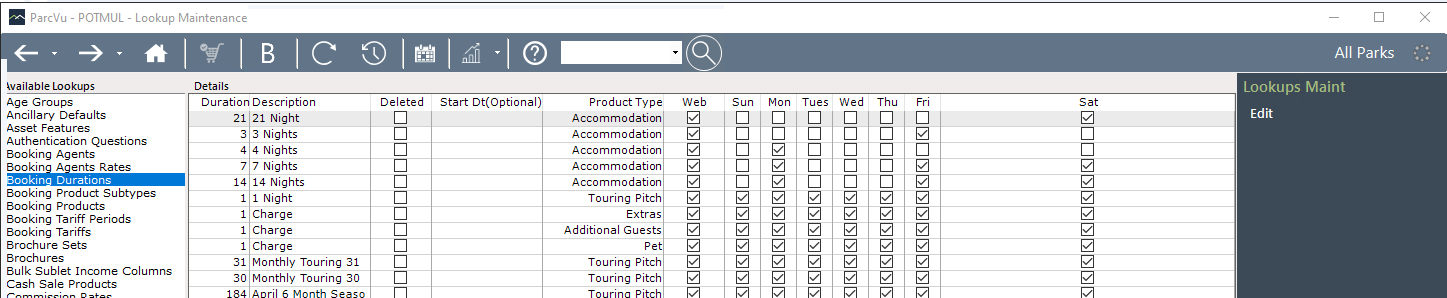
Duration is the number of nights that the break consists of For example, a weekend break might be Friday-Monday = 3
Description is the label you want to give this break length For example, you might label a Friday-Monday break as “Weekend”
Product Type defines whether it should be a duration used for Accommodation (Holiday Homes), Touring, Extras, Pets or Additional Guests For example, if you only specify a Weekend break must be 3 nights for a Gold 3 bed, which is a Holiday Home, you’d set the Product Type as “Accommodation”
Web defines whether users should be able to book this duration via your website For example, you may prefer not to make some durations widely available, and only use them for 'Direct Bookings’ made by your reception team where you have plenty of availability. An example of this might be a 2 night break for a Saturday & Sunday, which you wouldn’t want to make widely available but may be willing to take as a last minute booking where you have plenty of capacity
Sun - Mon are the arrival days permitted for that duration For example, Weekend might only have Fri checked, as you only allow arrivals for that duration on a Friday
Once you have created your master list of Durations, you can then define which Durations are available at each of your Parks. You can find out more about this here: Park Booking Durations
You must set Park Booking Durations before you can price up the breaks at your Parks. If a Duration is not available in your Booking Tariffs, you should check that it has been added to Park Booking Durations