Add a Park Booking Duration in ParcVu Desktop
Last updated 4 months ago
The Park Booking Durations function in ParcVu Desktop is only available to existing customers who previously signed up for the legacy ParcVu Bookings module. New subscribers will be offered enrolment in the Booking Experts module. Existing customers using legacy Bookings will be offered the opportunity to upgrade to Booking Experts - contact your Account Manager for more information
Park Booking Durations allows you to define which break lengths you allow at your individual Parks, and to produce separate pricing per break per Park allowing flexibility that suits your different target demographics
To access this function, the user must have the Allow Access System Sub Menu user permission
From the Home screen, go to System Maintenance Sub Menu > Maintain Lookups > Park Booking Durations
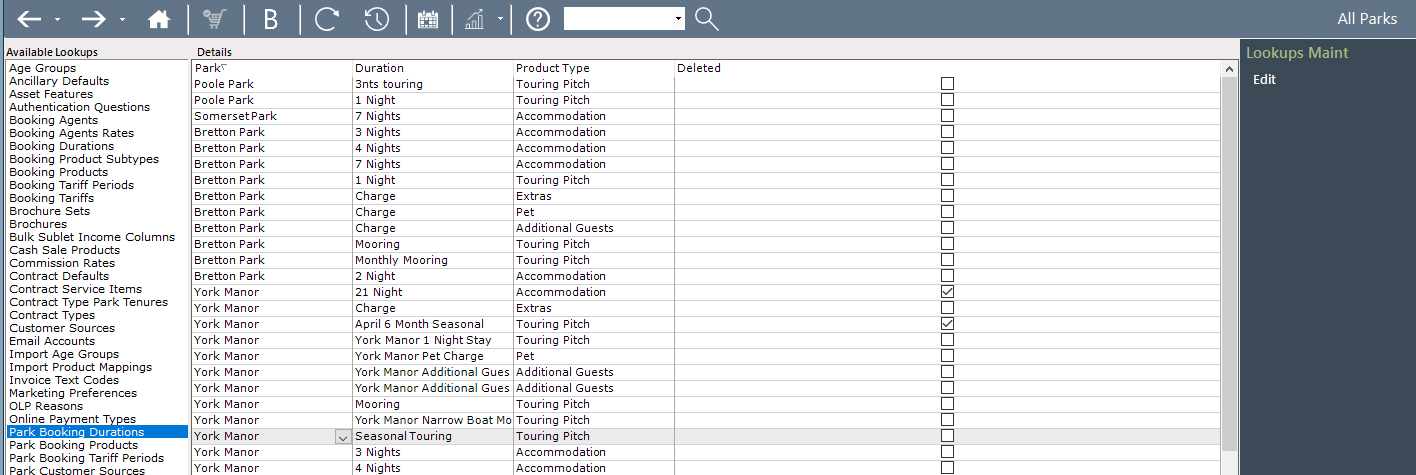
Add a Booking Duration to a Single Park in ParcVu Desktop
Click ‘Edit’ from the right hand side, and scroll to the bottom of the list where a blank line will be presented
Select the Park, then the Duration

Remove the block from the ‘Deleted’ column, and ‘Save’
Add a Booking Duration to All (or Multiple) Parks in ParcVu Desktop
If the Duration applies to all or several Parks, you can click ‘Edit’ then ‘Add to All Parks’ on the right hand side
Select the duration from the dropdown, then choose either ‘Toggle All’ or select individual Parks by ticking them
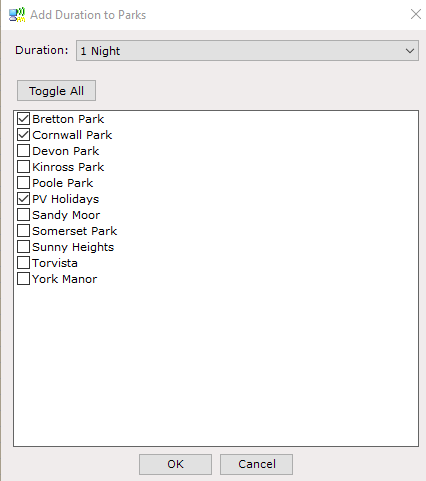
Click ‘OK’ and the ‘Duration’ will have been added to the selected Park(s)
Click ‘Save’