☑️ Paying Commission
Last updated 8 months ago
This function is optional for tracking Commission payments
Commission cannot be paid on a Sale until the Sale is Completed
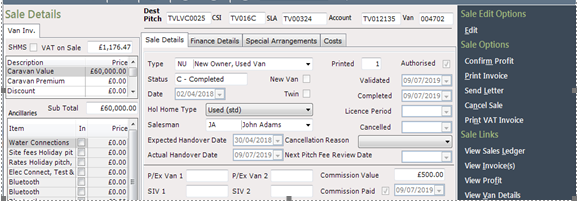
When Commission Claims have been received and authorised for payment, the ‘Commission Paid’ flag needs to be set on the Sale.
On the Sale Details screen, select ‘Edit’ from the Navigation list on the right-hand side of the screen
Click into the box at the side of the ‘Commission Paid’ to tick and flag it and then enter the Date using the drop-down Calendar at the side of the field, click ‘Save’.