☑️ Maintain Direct Debits in ParcVu Desktop
Last updated 6 months ago
If you offer a Direct Debit scheme for the payment of running costs, you can record the Customers who are enrolled in the scheme and manage posting their payments in ParcVu Desktop
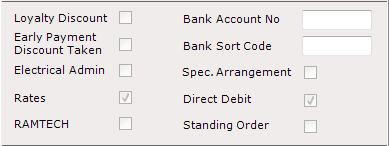
On the Owner Account, set the ‘Direct Debit’ flag on the Account Details screen to be ticked
Select Maintain DD from the navigation list
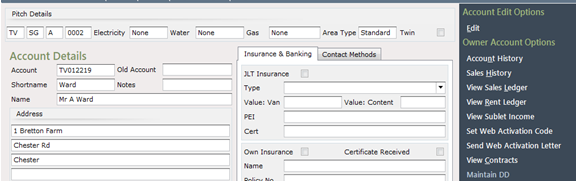
Select ‘Add New’ on the navigation list and the Maintain DD pop up will appear
Enter an appropriate Description for the Direct Debit payments and set the Start Date and amount of Payments to be made then enter the payment amounts.
In some cases the “first and last” payments for a direct debit differ from the regular amount. It’s possible to set different amounts if required. Alternatively, all 3 values can be set at the regular amount if that reflects the Customer’s agreement
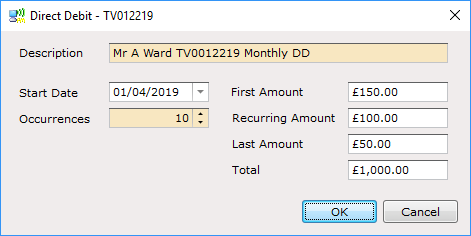
Click ‘OK’ when done.
The screen will now show the DD details set up.

The account will now be picked up via the ‘Post Direct Debit Payments’ screen
If a Customer decides they no longer wish to go ahead with Direct Debit before it starts, you can uncheck the flag on the account and set the Occurrences to 0
If after X amount of payments, they decide to cancel the Direct Debit and pay the balance in full, update the number of Occurrences to reflect the total number of payments they have made and then uncheck the Direct Debit flag