Amend a Booking Price in ParcVu Desktop
Last updated 4 months ago
The Bookings function in ParcVu Desktop is only available to existing customers who previously signed up for the legacy ParcVu Bookings module. New subscribers will be offered enrolment in the Booking Experts module. Existing customers using legacy Bookings will be offered the opportunity to upgrade to Booking Experts - contact your Account Manager for more information
To use this function, the user will need the Edit Bookings and Override Booking Prices permissions
Navigate to the Booking Details screen of the required booking. Select ‘Edit’ from the Navigation list and the grid at the bottom of the screen showing the Product Booked, Dates and Prices will be highlighted.
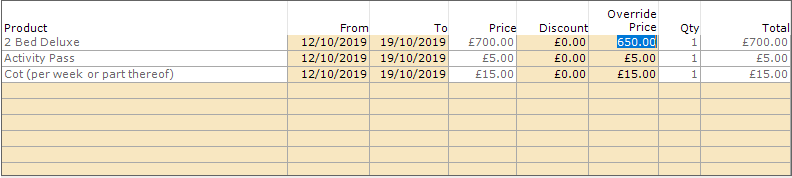
Double click into the ‘Override Price’ column on the Price displayed to highlight it and enter the new Price.
Select ‘Save’ on the Navigation list and the booking will be updated to show the new Price.
An increase in Price will show the increased amount in the ‘Discount’ column preceded by a (-) minus
A decrease in Price will show the reduction value in the ‘Discount’ column without a (-) minus
When details are changed on a booking the details changed message will be displayed asking if you would like to notify the holiday maker, select yes or no as appropriate