Set Up Park Information for SUN Imports in ParcVu Desktop
Last updated 4 months ago
The Sun Imports function in ParcVu Desktop is only available to existing customers who previously signed up for the legacy ParcVu Bookings module. New subscribers will be offered enrolment in the Booking Experts module. Existing customers using legacy Bookings will be offered the opportunity to upgrade to Booking Experts - contact your Account Manager for more information
The Site Code used by the SUN Bookings which is used on the file provided for importing must be set up for each Park
To access this function, the user must have the Allow System Maintenance Menu user permission
From the Home Screen, go to System Maintenance Sub Menu > Maintain Parks
In the Maintain Parks screen, click on the required Park line to highlight it and the selected Park details will be displayed.
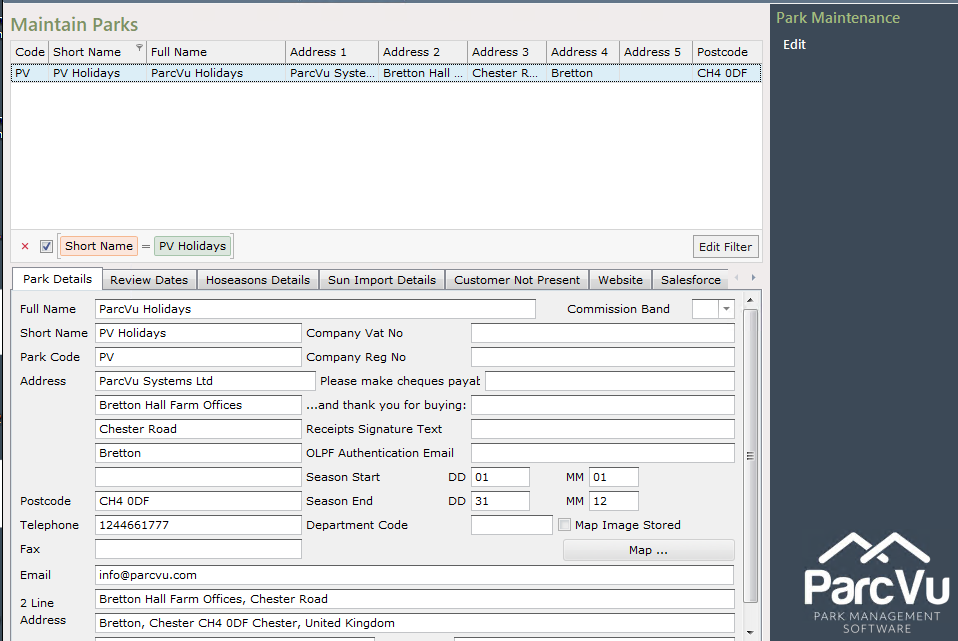
Click on the ‘Sun Import Details’ tab.

The ‘Site Code’ field will be displayed. Select ‘Edit’ from the Navigation list on the right and the field will be highlighted
Enter the Site Code Number as used on the Sun Import file, then click ‘Save’ on the Navigation list on the right

The ‘Sun Import Details’ are now set up for the required park
This should be done for every Park that will be importing Sun Bookings
Before you can use the Sun Import process, you must enable Sun Imports and map the Linen product in Client Configuration. You can find out more about this here: Configuration Settings for Sun Imports in ParcVu Desktop