☑️ Mark a Rent Ledger Invoice as ‘Disputed’ in ParcVu Desktop
Last updated 6 months ago
It is possible to flag an invoice on a Rent Ledger as ‘Disputed’ if the invoice is in question. If the invoice has not been Cash Matched, an option will be available on the Navigation list to ‘Mark Disputed’
If the option to Mark Disputed isn’t available, check the settlements (‘View Settlements’) and unmatch any cash, the option will then display
Navigate to the required Owner Rent Ledger. Click on the required invoice in the list and select ‘Mark Disputed’.

The column headed ‘Dispute’ will now show a ‘Tick’ at the side of the selected invoice.

Once the query with the invoice is resolved, this flag can be removed by selecting ‘Mark Not Disputed’ on the navigation list
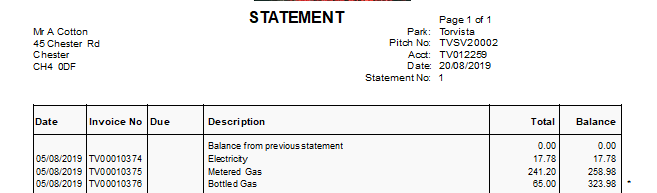
A ‘Disputed’ item will show with an ‘ * ‘at the side of it when the Rolling Statement is printed.

An explanation of the ‘ * ‘will show at the bottom of the statement
Cash Matching is not available for a disputed invoice - if an invoice is not showing as available to settle in the Cash Matching screen, ensure it is not disputed