Add Van Repair Dates in ParcVu Desktop
Last updated 4 months ago
The Van Repairs function in ParcVu Desktop is only available to existing customers who previously signed up for the legacy ParcVu Bookings module. New subscribers will be offered enrolment in the Booking Experts module. Existing customers using legacy Bookings will be offered the opportunity to upgrade to Booking Experts - contact your Account Manager for more information
If a Holiday Home needs to be temporarily removed from rental, for example the safety test has expired or a repair prevents occupancy, it’s possible to place it Under Repair.
To access this function, the user will need the Edit Repairs user permission
Navigate to the affected unit, and select Repairs from the navigation menu on the right hand side
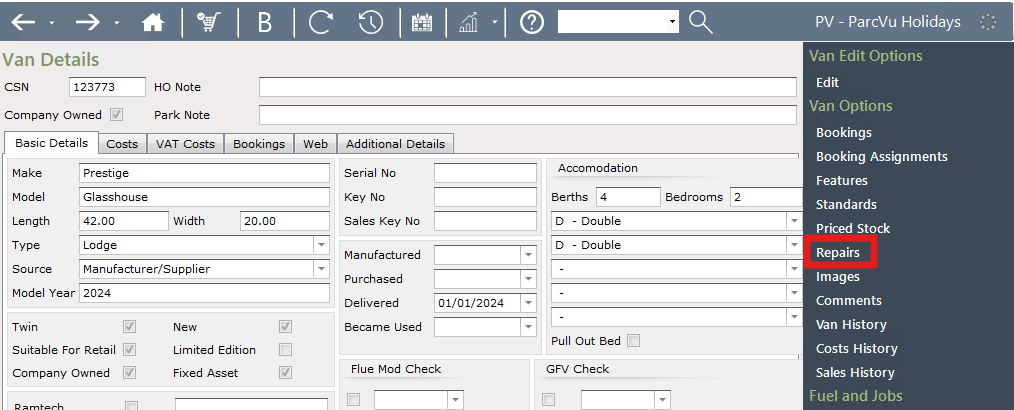
The ‘Repair Dates’ screen will then be displayed, and any previously added repair dates will be shown. From the Navigation list on the right, select ‘Add Repair Date’.
A new line will be added into the top grid showing today’s date, double click into the ‘Repair Start Date’ and ‘Repair End Date’ columns and enter the required Repair dates. When finished, select ‘Save Changes’ from the Navigation list on the right.

The ‘Repair Dates’ will then be updated on the system.
If the Repair takes more or less time than anticipated, you can ‘Edit’ or ‘Delete’ the existing Repair as appropriate
The Van will now be unavailable for Bookings during the Repair date period set. This can be viewed on The Park Booking Overview screen which is found in the Bookings section of the Menu.
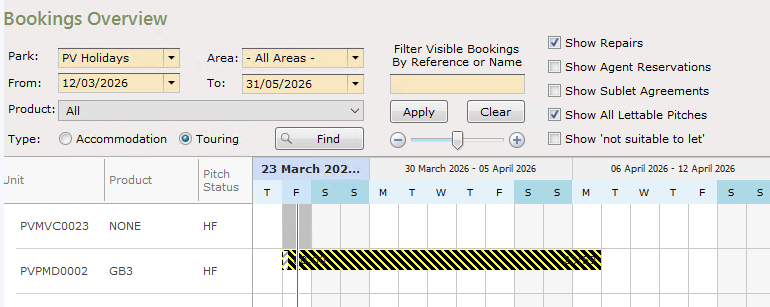
Hover your mouse over the Repair line in this screen and the Repair Date details will be displayed.
If a Van Repair will clash with an existing booking on the selected Pitch then a warning message will be displayed:
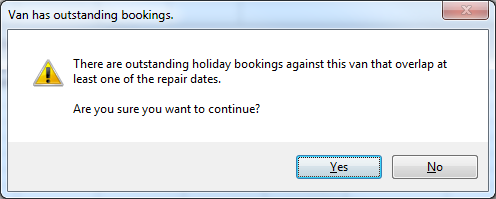
Any affected bookings should be moved prior to setting the Repair Dates
It’s also possible to place Touring Pitches under repair - you can find out more about this in the article Pitch Repairs in ParcVu Desktop