☑️ Field Validation in ParcVu Desktop
Last updated 7 months ago
To create Field Validation Rules, the user must have the Allow Access User Input Validation user permission
It is possible to set up Field Validation rules to control the format of Account fields in ParcVu Desktop
From the Main Menu, select ‘Open System Maintenance Sub-menu’
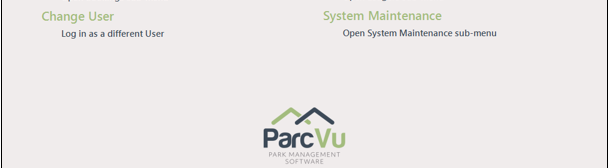
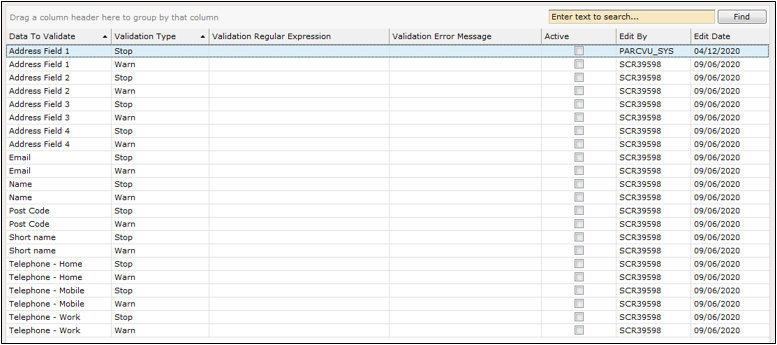
In the ‘Codes and Descriptions section, select ‘Field Validation Rules’.

There are two types of rules, select which type you want to enforce in the ‘Validation Type’ column. You can either choose to show a ‘Warning’ or ‘Stop’ the user from saving until a field is fixed.
In the ‘Validation Regular Expression’ column, you specify the rule. Examples are given in the following sections.
Ensure A Field Contains Only Letters and Numbers, and is Longer Than 3 Characters
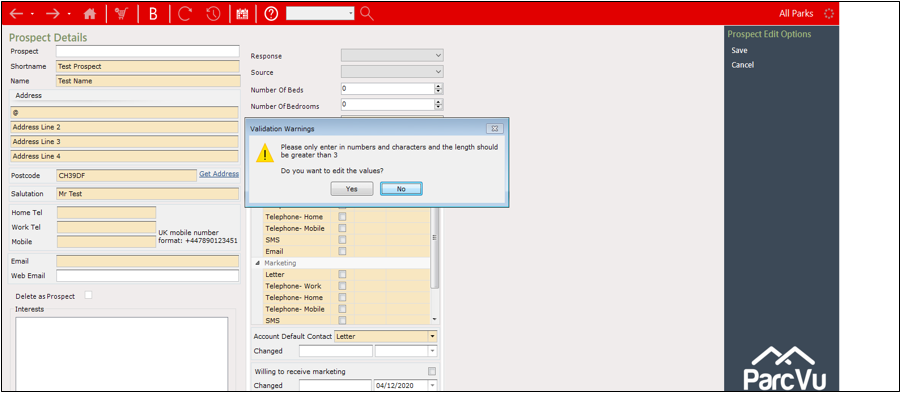
To trigger a warning to make sure Address Field 1 only contains letters “a-z” or “A-Z” or numbers “0-9” and must be at least 3 characters long:
In a regular expression this looks like this: ^[a-zA-Z0-9''&]{3,}$

If you try to create a Prospect using the @ symbol as the first name, then the warning message will appear containing the text that was populated.
Ensure A Field Is Capitalised
To add in another rule forcing all Names to be capitalised for example,
you can trigger a stop event to make sure that the name value only contains capitalised letters A-Z.
In a regular expression evaluator this looks like this: ^[A-Z''&]

If a booking were created using the word ‘Test’ as the Name, a ‘STOP’ alert will appear forcing the user to change the value as it should all be in capitals.
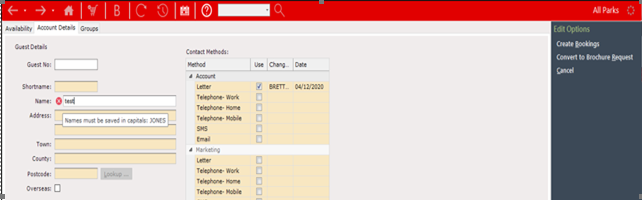
The rules are applicable in all places where these fields can be found: Account Details, Prospects, Bookings, Non owner account creation etc.
Further Example Rules
Resources For Creating Regular Expressions
The rules are built using industry standard regular expressions and there are many online tools to help create specific rules for your business.
https://www.freeformatter.com/regex-tester.html
Or it is possible to google solutions like “regular expression to capitalise the first letter”.
Please note regular expressions can be really powerful however they are also complicated to create.