☑️oAuth Email Authentication in ParcVu Desktop
Last updated 7 months ago
Your IT Support Partner may need to assist with the following steps. ParcVu Support are not able to complete the following steps, they must be completed by you/your IT Support Partner
Set up an application in Microsoft Entra ID (formerly Azure AD) for OAuth authentication
Register the Application in Entra
Navigate to the URL below
https://entra.microsoft.com/#view/Microsoft_AAD_RegisteredApps/ApplicationMenuBlade/
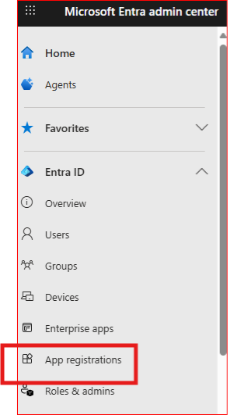
Click App Registrations
Click + New Registration
Fill in:
Name: Your app name
Supported account types: Choose who can use the app (e.g., single tenant or multi-tenant)
Redirect URI: Add your app’s redirect URI (e.g., https://yourapp.com/auth/callback)
Click Register.
Configure Authentication
In the app registration overview, go to Authentication.
Add Redirect URLs for web or mobile platforms
Enable Access tokens and ID tokens under Implicit grant and hybrid flows if needed.
Save changes.
Create Client Secret or Certificate
Go to Certificates & secrets
Expand Manage, under Client secrets, click + New client secret
Add a description and expiration period.
❗Save the value securely — you won’t be able to view it again
Client secrets expire - it’s important to make a note of the date of expiry and ensure that you renew the secret before expiry. You’ll need to supply the updated secret to ParcVu to ensure oAuth continues to function
Set API Permissions
Go to API permissions.
Click + Add a permission
Choose Microsoft Graph
Select Application permissions
Under Select permissions, scroll down to the Mail section and tick the Mail.Send permission
Click Add permissions button at the bottom
Select Grant admin consent
Provide oAuth Details to ParcVu Support
Please provide the following information to ParcVu Support via email. Our Developers will then enable oAuth for your ParcVu environment
Customer Name
Client ID
Tenant ID
Client Secret
Client Secret Expiry Date
It is the responsibility of the customer or IT support partner to monitor the expiry of the secret and to advise ParcVu once expired with the new secret.