☑️ Adding a ‘Standard Job’ in ParcVu Desktop
Last updated 9 months ago
From the Owner ‘Account Details’ screen (or ‘Van Details’ screen), In the Fuel & Jobs section on the Navigation list, select ‘View Jobs’.
The Jobs list screen will be displayed, from the Navigation list on the right, select ‘Add Standard Job Order’.

The Standard Jobs pop up will appear and the drop down list will show any pre-set up jobs for selection.
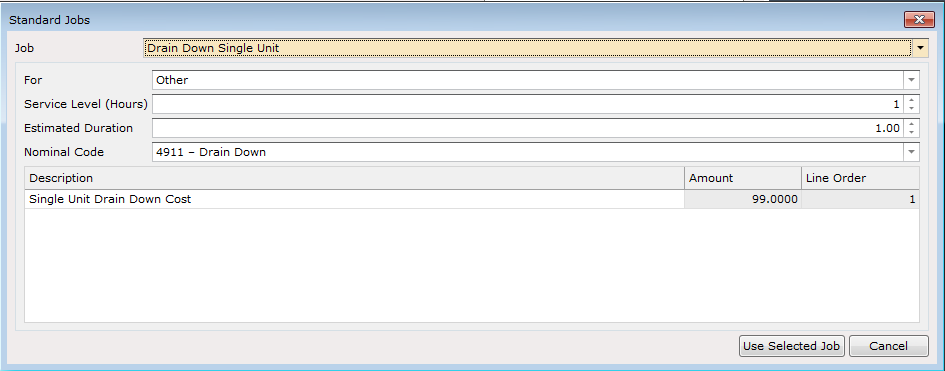

Select the required job from the list and then click on the tab at the bottom.
The Jobs screen will then update to show all the job details and the Cost if the job has been pre priced.
Enter the ‘Placed By’ name and also set the ‘Assigned To’ details :
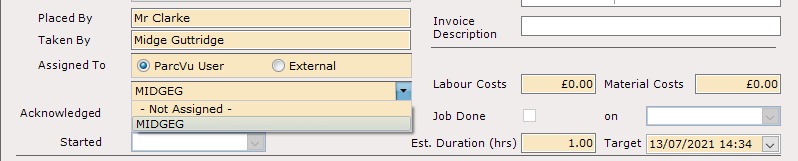
Then click ‘Save’ on the navigation list.
The Printer selctor will then be displayed to select the printer to send the Job sheet to.
Completing the job now happens in the normal way, when done select to ‘Mark the Job as done’ on the navigation list.

This will then automatically input the ‘Job Done’ flag and date
The ‘Labour Costs’ and ‘Materials Costs’ fields above the ‘Job Done’ date are where the Cost of the job to the Park values for ‘Labour and Materials’ should be entered.
NOTE: These are not visible to the customer on the Invoice.
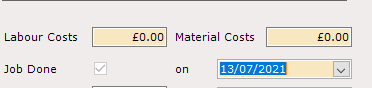
If you require the Invoice to show the breakdown of ‘Labour’ and ‘Materials’ Charges to the Owner, complete the fields at the bottom of the screen, enter the actual values to be charged to the Owner. The total of a Pre priced job will already be shown.
NOTE: It is not possible to amend the cost of a pre priced job.
When finished, click ‘Save’ from the Navigation list.
For the Charge to be posted to the Owners ‘Rent Ledger Account’, select ’Site Charges Invoice’ from the Navigation list.
The ‘Nominal Code’ for the pre priced job will be auto entered but can be amended if required, enter the description of the job to appear on the Invoice into the ‘Invoice description’ field and click ‘Save’ on the navigation list.
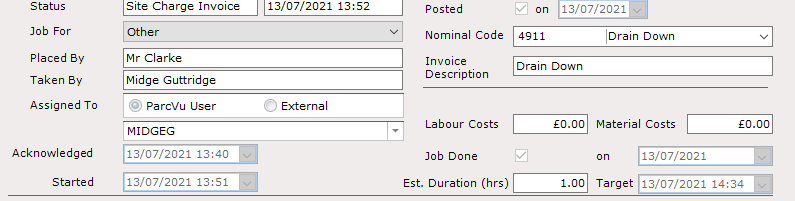
Select to Print or Email the Invoice and the Charges will then be posted to the Owners Rent Ledger Account.