☑️ Authorise a Sale
Last updated 8 months ago
To perform this action, the user must have the Authorise Sale (Pk/HO) permission
A Sale should be ‘Authorised’ by the designated person to confirm his/her agreement with the Sale details. This process varies between businesses but best practice is to have a manager check all figures and authorise the sale prior to any paperwork being presented to a customer
Once ‘Authorised’ the Sale details cannot be changed or amended but can still be ‘Cancelled’ if necessary
The sale can be Unauthorised if necessary, but best practice is to ensure all values are correct prior to authorising
In the Sale Details screen, select ‘Authorise for Validation’ from the Navigation list on the right-hand side of the screen

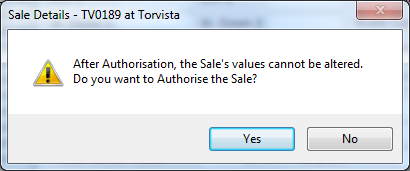
Confirm the details by Selecting ‘Yes’ to Authorise in the message box
A ‘tick’ will appear in the ‘Authorised’ field on the ‘Sales Details’ screen

The Sale is now in ‘Authorised’ status and current Company instructions regarding paperwork etc should be followed