Set Park Booking Products in ParcVu Desktop
Last updated 4 months ago
The Park Booking Products function in ParcVu Desktop is only available to existing customers who previously signed up for the legacy ParcVu Bookings module. New subscribers will be offered enrolment in the Booking Experts module. Existing customers using legacy Bookings will be offered the opportunity to upgrade to Booking Experts - contact your Account Manager for more information
Once a new Booking Product is set up either for a Touring, Accommodation or Extra, it must be added to the Park Booking Products so that it’s available for pricing and to be assigned to Holiday Homes and Pitches (where appropriate)
To access this functionality the user must have the Allow System Maintenance Sub Menu user permission
From the Home Screen, go to System Maintenance Sub Menu > Maintain Lookups > Park Booking Products
Adding a Booking Product to All Parks
From the right hand navigation menu, select Add To All Parks
A Popup will be presented to select the Product and allow the user to either Toggle All or select the Parks that apply
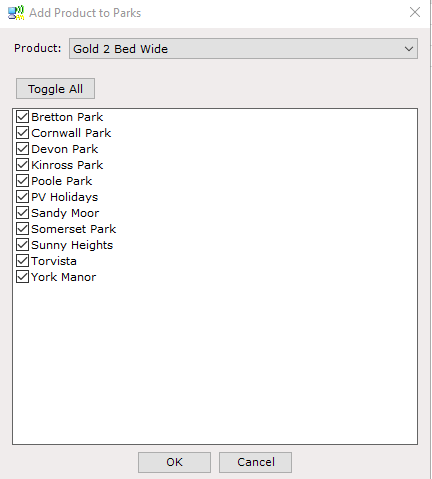
Click OK once the Product and Parks are selected, then Save
The Booking Product will then be a Park Booking Product at all of the selected Parks, and available to be priced in the Booking Tariffs
Adding a Booking Product to a Single Park
From the right hand navigation menu, select Edit
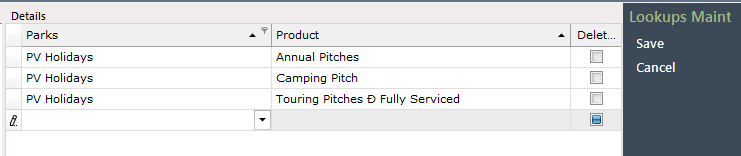
In the blank row at the bottom of the grid, select the Park, then the Product
Uncheck the ‘Deleted’ marker
Then click Save
The Booking Product will then be a Park Booking Product at the selected Park, and available to be priced in the Booking Tariffs