Process Lapsed Booking Letters in ParcVu Desktop
Last updated About 1 hour ago
The Process Lapsed Bookings function in ParcVu Desktop is only available to existing customers who previously signed up for the legacy ParcVu Bookings module. New subscribers will be offered enrolment in the Booking Experts module. Existing customers using legacy Bookings will be offered the opportunity to upgrade to Booking Experts - contact your Account Manager for more information
This function allows a user to identify which bookings have failed to pay their deposit or final Payment by the required due date, and send reminders to customers
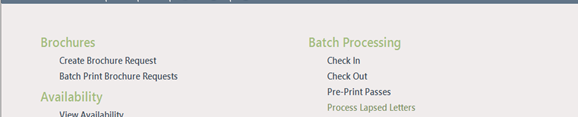
From the Home Screen, go to Bookings Sub Menu > Process Lapsed Letters
The ‘Find Lapsed Payment Bookings’ screen will be displayed. Select the required criteria and click all bookings with ‘Lapsed’ payments within the selected criteria will be displayed in the grid.
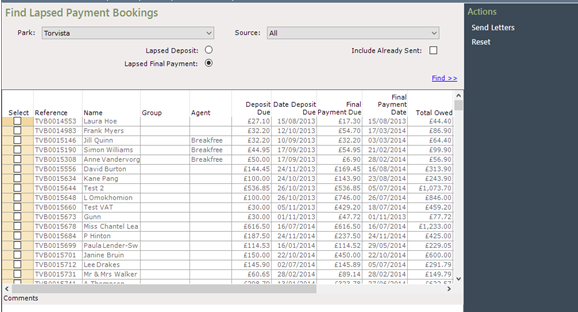
If there is a Comment on a booking, when you click onto it on the grid, the corresponding Comment will be displayed in the ‘Comments’ field below the grid
Select the Bookings you wish to send Letters/Emails to by clicking into the boxes on the left.
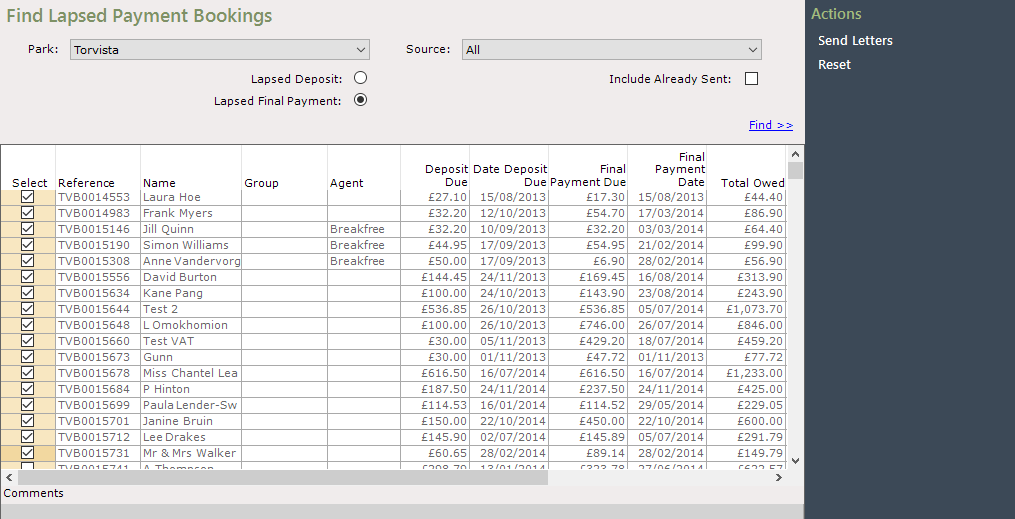
Select ‘Send Letters’ on the Navigation list, a ‘Confirm’ message will appear asking ‘are you sure’?
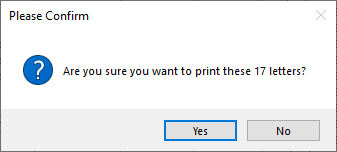
Click ‘Yes’ and the processing pop up will be displayed.

If there are any issues, an error message will appear stating what these were, otherwise the Letter will be sent to the default Printer ready to be sent to the Customer.
If the customer’s account is set to Preferred contact method ‘Email’, then an email will be sent rather than a letter printed