Forgotten Password in ParcVu Desktop
Last updated 4 months ago
System Settings are Now Available in ParcVu Online!
This function is now available in ParcVu Online! For the best user experience, we recommend switching to ParcVu Online to ensure you always have access to the latest features. Find out more about Forgotten Passwords in ParcVu Online here: Forgotten Password in ParcVu Online
Continue in ParcVu Desktop
You won’t be able to use this option if you don’t know the answers to your security questions. If you’re unable to use the self-service option, you will need to contact your Internal ParcVu Administrator (the person who manages ParcVu users within your business)
If a user forgets their ParcVu password, they can use the self-serve ‘forgotten password’ option at login
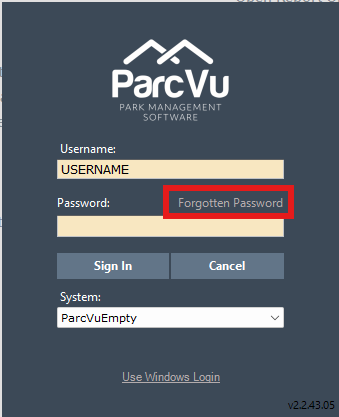
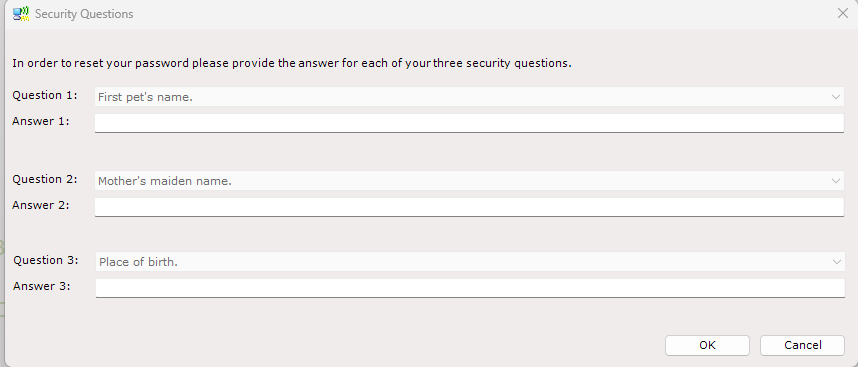
When selected, this function will present the user with 3 security questions. If they answer successfully, they’re able to enter a new password
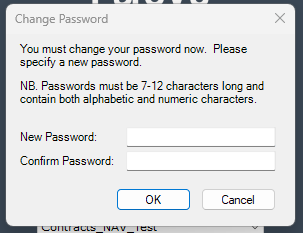
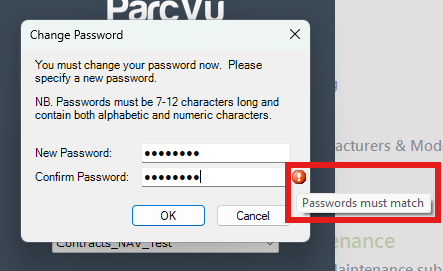
If the passwords don’t match in both fields, the User will see an alert next to ‘confirm password’ - hovering over this will display the explanation
Passwords cannot be immediately reused, there must be a minimum number of different passwords before a User can reuse an old password. For more information, click here:
Reusing Passwords in ParcVu Desktop
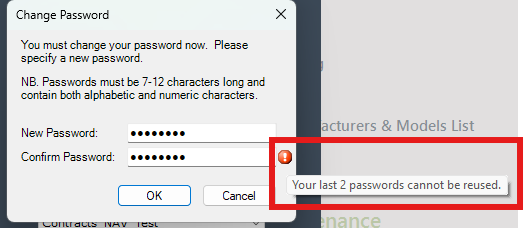
If the User tries to enter a previously used password, they’ll see an alert next to ‘confirm password’ - hovering over this will display the explanation
Was this helpful?
Still need help? Share an idea