Bulk Check Out in ParcVu Desktop
Last updated 4 months ago
The Bulk Check Out function in ParcVu Desktop is only available to existing customers who previously signed up for the legacy ParcVu Bookings module. New subscribers will be offered enrolment in the Booking Experts module. Existing customers using legacy Bookings will be offered the opportunity to upgrade to Booking Experts - contact your Account Manager for more information
Multiple Bookings can be checked out simultaneously using the ‘Batch Processing’ function in the Booking Sub-Menu. This is particularly useful for if you have out of hours check-outs where the Guests simply return keys, or for Touring Bookings where Guests simply depart without checking out.
From the Home Screen, go to Bookings Sub Menu > Bulk Check Out
The ‘Find Checked In Bookings’ screen will be displayed.
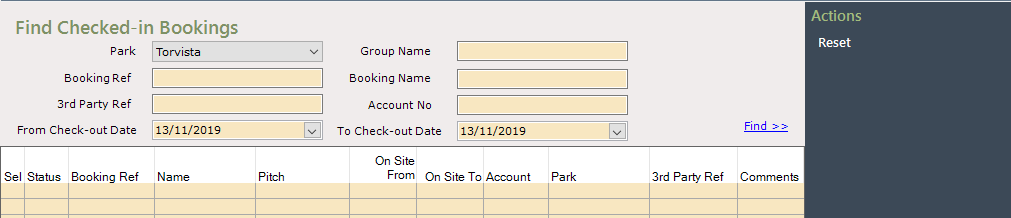
Use the filters to find the Bookings to check out

To ‘Check Out’ the customer, click into the box in the ‘Sel’ column to ‘tick and select it and an option to ‘Check Out’ will show on the Navigation list, select ‘Check Out’

If there are any issues with the selected Booking being ‘Checked Out’ a message will be displayed showing relevant detail
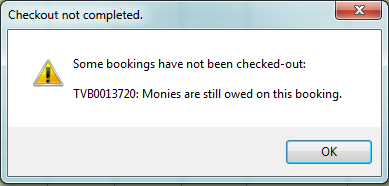
This is not a system error and does not need to be reported to ParcVu Support - resolve the issues listed, and you’ll be able to check the Booking out
Where there are no issues selecting ‘Check Out’ will remove the Booking from the grid.
The Booking Details screen will now show that the Booking has a Status of ‘Checked Out’.
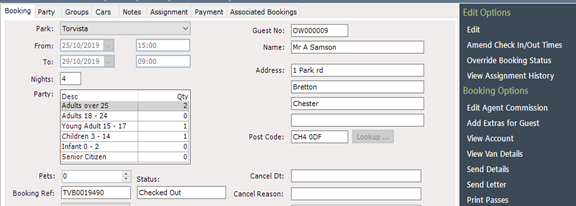
After ‘Check Out’, the Unit must be updated and marked as ‘Clean’ at the appropriate time, ready for the next Arrivals to be ‘Checked In’