Add an Age Group in ParcVu Desktop
Last updated 4 months ago
The Age Group function in ParcVu Desktop is only available to existing customers who previously signed up for the legacy ParcVu Bookings module. New subscribers will be offered enrolment in the Booking Experts module. Existing customers using legacy Bookings will be offered the opportunity to upgrade to Booking Experts - contact your Account Manager for more information
It’s possible to define different Age Groups to get a better understanding of your Park demographics, and enable more efficient planning for activities etc on Park
To access this function, the user will need the Allow System Maintenance Menu permission
From the Home Screen, go to System Maintenance Sub Menu > Maintain Lookups > Age Groups
Select ‘Edit’ from the Navigation list on the right, the ‘Details’ screen will then be highlighted

A blank row will be added at the bottom of the existing list - enter the information for your new Age Group here
Code is the internal reference code for this Age Group
Description is the name of the Age Group
Default is the Age Group which should be assumed if the specific Guest information is not provided
Deleted can be checked on existing Age Groups to remove from active use
Occupies Berth defines whether a person in that Age Group counts towards the occupancy for the unit when determining how many people should be able to book a specific unit
Min Age and Max Age determine the bracket in which a person falls into that Age Group
Adult needs to be checked for any age groups you’d like to count as an Adult, any others will count as Children
It may seem strange to need to set an Age Group called “Adult” and then specify it as Adult - this is required as system-wise there are at the core only 2 types of Guest: Adult and Child. The Age Groups function is an additional level you can use to further breakdown those subgroups to better understand your demographic, so you may have 18-25, 26-35, 36-45 etc all as Age Groups, but the system would need to understand that each of these counts as “an Adult”
When finished select ‘Save’ on the Navigation list on the right and the new details will be updated on the system
Remember to set pricing for each Age Group in the Additional Guests Tariffs. You can find out more about setting Tariffs in the article Set Booking Tariffs in ParcVu Desktop
Forgetting to set the pricing for all types of Additional Guests will result in the following error when doing an availability search;
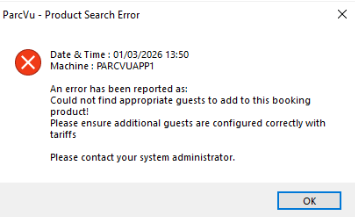
This is not a system error and does not need to be reported to ParcVu Support - once the missing Tariffs are added, you will be able to conduct the availability search