View and Use a Park Map in ParcVu Online
Last updated About 24 hours ago
To use this function, the user will need the Allow Access Park Maps Screen user permission
Ensure you have the correct Park set in the top right of your screen, then from the Main Menu select Maps
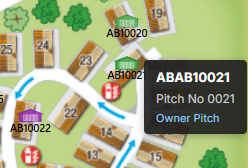
The map has a ‘Key’ which shows the colours used by the Pitch Markers on the Pitches to show their status, i.e. Owner, Sales Van, Hire Fleet, Touring etc

You can use the Key to filter which Pitches to show on the map, by ticking/unticking Statuses as appropriate
Hovering over a Pitch/Van will display the Pitch Number and Pitch Status
Clicking into the Pitch will redirect to the full Pitch Details screen