ParcVu Online
Starting with ParcVu OnlineSystem Maintenance in ParcVu OnlineCommunications in ParcVu Online
ParcVu Desktop
Starting with ParcVu Desktop☑️System Maintenance in ParcVu Desktop☑️Manage Users in ParcVu Desktop☑️Manage Stock (Vans/Holiday Homes) in ParcVu Desktop☑️Managing Pitches in ParcVu DesktopCommunications in ParcVu Desktop☑️Managing Payments in ParcVu Desktop☑️Managing Jobs In ParcVu Desktop☑️Dashboards in ParcVu DesktopManage Bookings In ParcVu Desktop☑️Manage Prospects in ParcVu Desktop☑️The Sales Process in ParcVu Desktop☑️Manage Owners in ParcVu Desktop☑️ Managing Sublet in ParcVu Desktop☑️Accounting in ParcVu DesktopReports in ParcVu Desktop
www.parcvu.com
    Home
  1. ParcVu Desktop
  2. ☑️Nominal Codes in ParcVu Desktop
  3. ☑️ Viewing Nominal Codes in ParcVu Desktop

☑️ Viewing Nominal Codes in ParcVu Desktop

Last updated 9 months ago

To access this area of the system, the user must have Allow System Maintenance Menu and Amend Nominals (H/O Only) user permissions, and must be set as a Head Office User

Go to System Maintenance Sub Menu > Maintain Nominal Codes

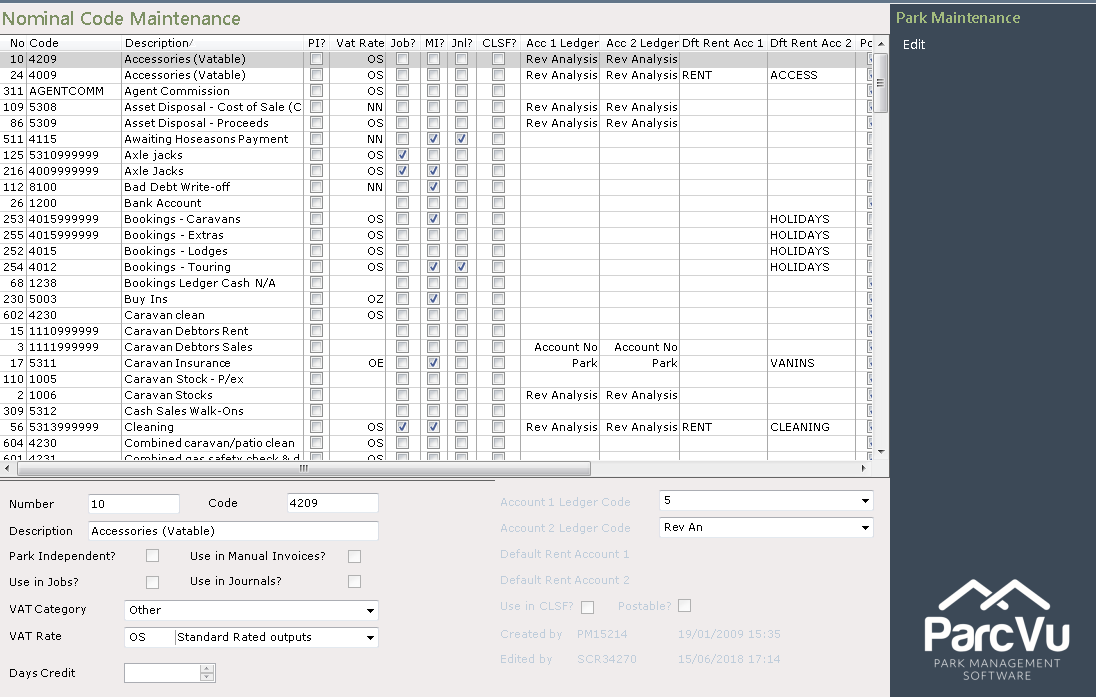
The ‘Nominal Code Maintenance’ screen will be displayed, showing all current Nominal Codes.
Was this helpful?
