☑️ Validate & Post A Sale
Last updated 8 months ago
To use this function, the user must be a Head Office user, and have the Validate Sale (HO Only) permissions
Once a Sale has been ‘Authorised’ by the General Manager or other designated person at Park and the required paperwork is in place, a Sale can be Validated. This is the point at which the postings are made to the ledger and the revenue is recognised for accounting purposes
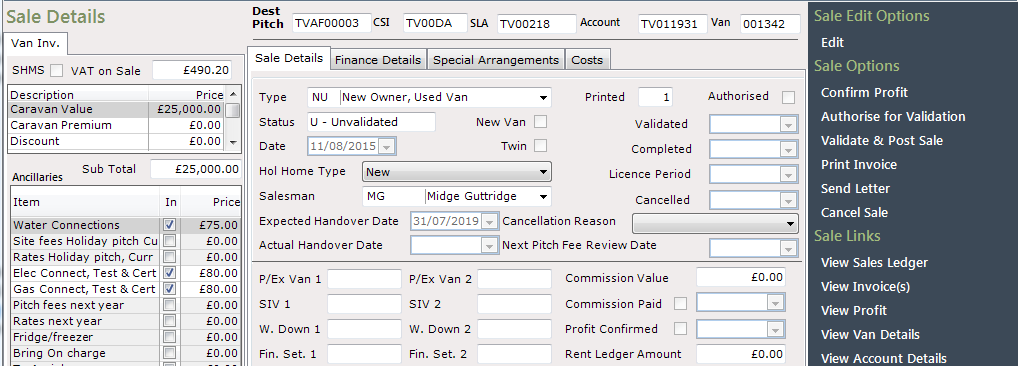
If your business uses the Profit Confirmed Questions to assist with ensuring validations are correctly carried out, you can see these in Confirm Profit
When all details are complete, select Validate & Post from the Navigation list on the right.
Confirm ‘Yes’ to the ‘Validation’ message if all is correct.
Validation cannot be undone it is therefore essential that prior to Validating a Sale, all appropriate checks are done including not only process checks such as paperwork, but financial checks such as the correct SIV, VAT and profit
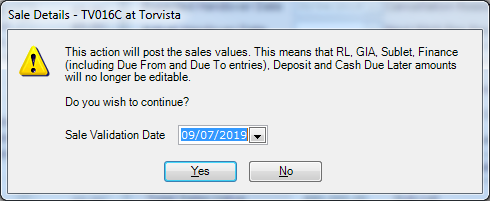
The system will now automatically complete the ‘Validation Date’, click ‘OK’ to the ‘Validation’ pop-up message.

The Sale is now ‘Validated & Posted’. No amendments can be made to the Sale at this stage. If there are errors, the Sale will need to be cancelled and restarted