Set Park Years in ParcVu Desktop
Last updated About 3 hours ago
System Maintenance is Now Available in ParcVu Online!
This function is now available in ParcVu Online! For the best user experience, we recommend switching to ParcVu Online to ensure you always have access to the latest features. Find out more about Park Years in ParcVu Online here: Set Park Years in ParcVu Online
Continue in Desktop
Park Years are used for Park Tariff Periods - you should set this as the calendar year or the end of your Season, whichever is later, with no gaps between the Years.
For example, if your Holiday season ends in November and restarts the following March, you’d set your Park Year to 1st January - 31st December
If, however, you rent over Christmas and close on 2nd January, you’d set your park year to end 2nd January, and start the following year from 3rd January
From the Home screen, select Open System Maintenance Sub-Menu > Maintain Lookups > Park Years
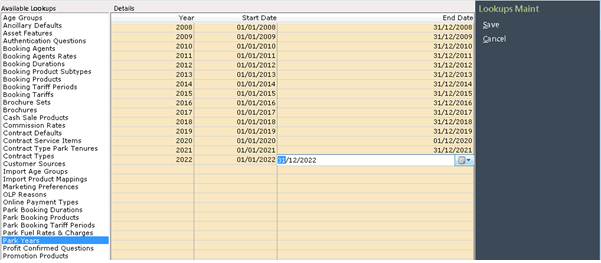
To add a new ‘Park Years’, click ‘Edit’ on the Navigation list on the right and the ‘Details’ screen will be highlighted. Click into the first blank line in the ‘Year’ column and type in the Year.
Next, click into the ‘Start date’ and End Date’ columns and type in the start and end dates for the year. When finished, select ‘Save’ on the Navigation list on the right and the details will be updated on the system.
You can set Park Years as far in advance as you’d like - we recommend doing this for the next few years where possible, so that you’re able to set pricing and availability for future years’ Bookings when you’re ready to
Still need help? Share an idea