Amend or Replace a Template in ParcVu Desktop
Last updated 4 months ago
Templates are Now Available in ParcVu Online!
This function is now available in ParcVu Online! For the best user experience, we recommend switching to ParcVu Online to ensure you always have access to the latest features. Find out more about Templates in ParcVu Online here: Edit a Template in ParcVu Online
To access this area of the system, the User will need the permissions Allow Access System Sub Menu and Can Maintain Templates
To change or replace an existing template, from the drop-down list in the ‘Medium’ field, select the required template type.
Email templates can be edited directly in ParcVu
Editing Letter Templates in ParcVu Desktop
From the drop-down list in the ‘Template’ field select the required Template. Select ‘View Document’ from the navigation list on the right. The selected document will then be displayed. Save the document to a location it can be accessed by ParcVu, make the required changes to the document and Save the document.
Then, in ParcVu, from the drop-down list in the ‘Medium’ field, select the required template type. From the drop-down list in the ‘Template’ field select the required Template. Select ‘Edit’ and then ‘Import Document’ from the navigation list on the right. A message will inform that the document already exists:
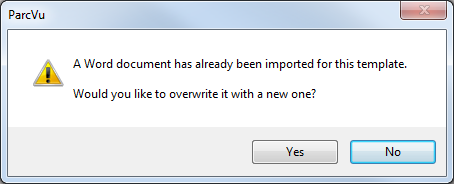
To import the amended document, select ‘Yes’, then select the document from the File locator displayed and click ‘Open’.
Select ‘Save’ on the navigation list and the amended document will have replaced the original one.