☑️Customer Sources in ParcVu Desktop
Last updated 10 months ago
Customer Sources is a Lookup that allows you to define where your Holiday Home Sales or Holiday Bookings come from - this information is useful for marketing purposes, allowing you to better understand your ROI on various campaigns and understand which partnerships are most effective
To access this area of the system the User will need both the Allow System Maintenance Menu and Can Maintain Customer Sources permissions
Caravan Sales Sources v Holiday Sources
If set for use in ‘Caravan Sales’ the Source Code will appear in the 'Source' drop down list selector for:
Sales
Prospects
Prospect Holiday Home Ownership Brochure Requests
If set for use in’ Holidays’ the Source Code will appear in the 'Source' drop down list selector for:
Bookings
Holiday Brochure Requests
If set for ‘Both’ then they will appear in all of the above picklists
Adding a New Customer Source in ParcVu Desktop
Go to System Maintenance Sub Menu > Maintain Lookups > Customer Sources
Select 'Edit' from the Navigation list, the screen will be highlighted, click into the first blank line in the grid and enter a 'Code' for the new source and then a 'Description'.
The description you enter here will be exactly as it’s displayed in the system. The code can be set to any short code you wish
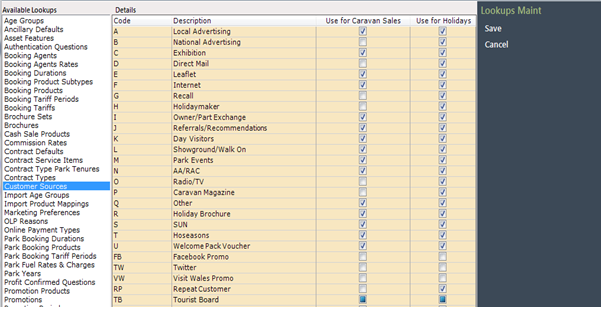
You can specify whether you’d like the source to be available for Caravan Sales and/or Holidays

Select 'Save' on the Navigation list and the new Source Code will be available for selection.
Amend a Customer Source in ParcVu Desktop
Go to System Maintenance Sub Menu > Maintain Lookups > Customer Sources
Select 'Edit' from the Navigation list, the screen will be highlighted, click into the field you’d like to edit, then select 'Save'
If you amend a Source Code Description, when you select 'Save' a warning message will appear stating 'Source Code ************** has been used - changing the description will change all previous instances to the new description'
This means that any references to that Source in the system will be updated to the new values. Please only amend an existing Customer Source if you’re happy to lose the history of the previous detail
Park Specific Source Codes
If you’d like to make a Customer Source for specific Parks only, you can use the Park Customer Sources Lookup in System Maintenance Sub Menu > Maintain Lookups > Park Customer Sources
Select ‘Edit’ from the navigation list and then select the required Park and the required Source code from the drop-down list, select ‘Save’ when finished
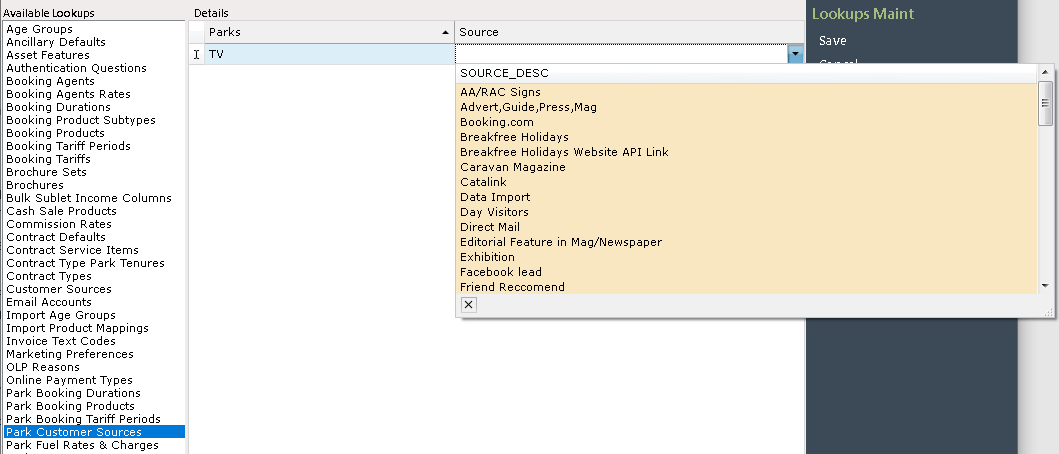
This Lookup should be used only if you want Customer Sources to be available at specific Parks. If a Customer Source should be available for all Parks, you should not add it here
Individually adding a Customer Source to every Park using this Lookup will actually prevent the Customer Source from showing at all. If your Customer Source should be available at all Parks and isn’t, check that it hasn’t been added here by mistake.