Bulk Communications ‘By Booking’ in ParcVu Desktop
Last updated 3 months ago
Bulk Communications are Now Available in ParcVu Online!
This function is now available in ParcVu Online! For the best user experience, we recommend switching to ParcVu Online to ensure you always have access to the latest features. Find out more about Bulk Communications in ParcVu Online here: Bulk Communications in ParcVu Online
Continue in ParcVu Desktop
To access this function, users will need the Allow into Bulk Communications permission
From the Main Menu, select Bulk Communications – ‘By Booking’. The ‘Find Booking’ screen will then be displayed. Any of the filters and yellow highlighted search fields can be used to find the required Booking(s).

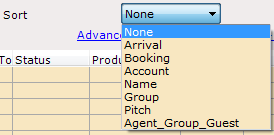
The ‘Sort’ drop-down list allows the results to be sorted by:
The ‘Method of Communication’ filters are located at the bottom of the grid and should only be selected once the initial Find>> has returned results as the initial Find>> will always default these filters to ‘All’

By default, the initial ‘Find’ will only include accounts where the ‘Accepts Marketing’ flag is set on the account, if the communication is required to be sent to All Accounts then the filter should be
